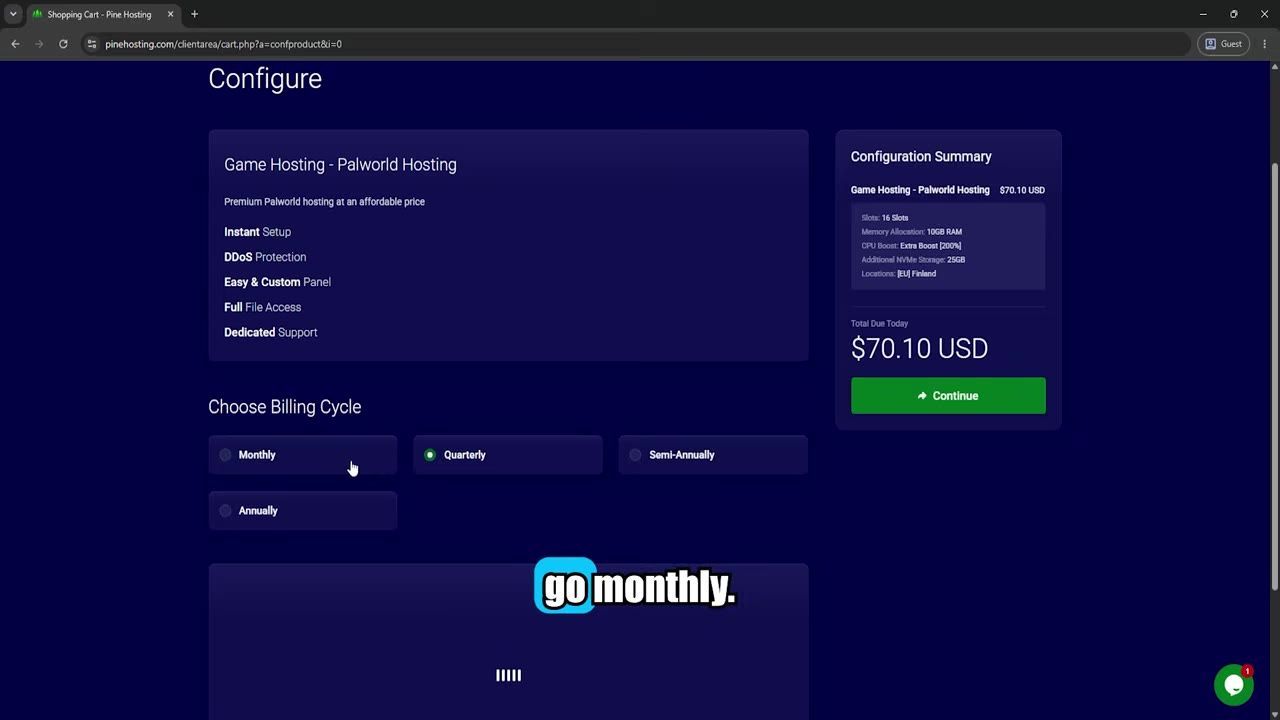
To optimize your Palworld server for multiplayer gameplay, rent a dedicated server from a provider like Pine Hosting for stable performance and easy configuration. Adjust your settings via the beginner-friendly server dashboard for optimal gameplay.
Choosing the Right Server Host
When setting up a Palworld server for multiplayer gaming, selecting the right hosting provider is crucial. Dedicated servers, such as those offered by providers like Pine Hosting, are highly recommended for their reliability, performance, and ease of use. These servers feature automatic uptime, robust hardware, and straightforward management dashboards that make setup and adjustments simple, even for beginners.
Hosting on a personal PC may lead to issues such as poor performance, disruptions when your computer is turned off, and complications with upload speed and port forwarding. Renting a professional server ensures uninterrupted gameplay and eases the burden of managing resources and system configuration. Choose a hosting plan that meets your needs in terms of player capacity, server location, and available resources like RAM.
Selecting your Palworld server host
- Choose a dedicated server hosting service: Reliable providers like Pine Hosting offer high-performance hardware, NVMe storage, and advanced features like automatic backups and DDoS protection.
- Avoid hosting on personal PCs: Limited upload speeds, inconsistent performance, and the need to keep your computer running 24/7 could hamper gameplay. Opting for dedicated hosting is more practical for multiplayer gaming.
Configuring Your Palworld Server
Once you've selected your hosting provider, the next step is configuring your server. Start by navigating to the host's server dashboard; this user-friendly interface simplifies initial setup and adjustments. After acquiring your server, you’ll receive an email with access to your control panel, where you can modify key settings, including player slots, RAM allocation, and server location.
By tweaking settings such as player capacity and resource allocation, you ensure smoother gameplay for all users connected to your server. The dashboard also provides access to metrics like CPU, disk, and memory usage, enabling you to monitor and optimize performance.
steps
- Access the server dashboard using the link provided in your welcome email from the hosting provider.
- Set the desired number of player slots for your server to accommodate your group size.
- Adjust RAM allocation to optimize server performance, particularly if you plan to host many players or run mods.
- Specify a server location closest to the majority of your players for reduced latency.
- Confirm your server setup and start the server to begin gameplay.
Gameplay Enhancement Settings
Enhancing gameplay for your Palworld server is straightforward thanks to dedicated hosting dashboards. Players can easily adjust settings such as difficulty levels. Using the dashboard eliminates the need for manual config file editing, enabling users to quickly implement desired settings without additional technical complexity.

The server settings panel for Palworld displays various editable options, including difficulty adjustment. — uqc
FAQ: Configuration Settings for Palworld Servers
FAQ
What configuration settings can be adjusted for Palworld servers?
Through the hosting provider's dashboard, you can configure player slots, RAM allocation, server location, and gameplay features like difficulty levels. The dashboard makes adjustments simple without needing to edit config files manually.
Can players join a server without you needing to keep your PC on?
Yes, using a dedicated server from a provider like Pine Hosting ensures uninterrupted access for players even when your personal computer is turned off.
Sources
Screenshots on this page are frames from the videos below, used to illustrate the steps they describe. All rights remain with their creators.
- Best Palworld Server Hosting (2026) | Updated for 1.0! ⭐ — uqc, July 14, 2026
Checked against:
- v1.0.3: Balance Adjustments & Bug Fixes — pocketpair_dev, 2026-08-12