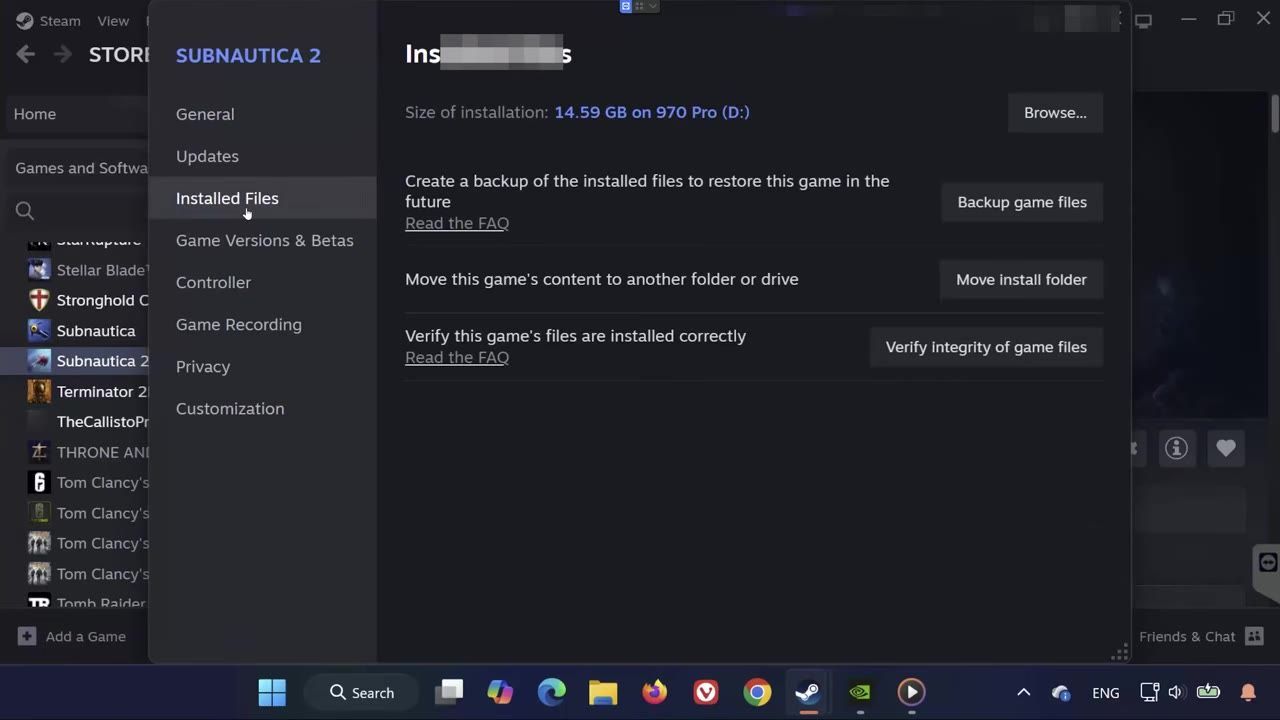
To resolve Subnautica 2 crashing on startup, verify your game files through Steam and ensure your drivers, system files, and Visual C++ Redistributables are up-to-date. If issues remain, adjust compatibility settings or perform a clean system restart.
Verify Integrity of Game Files
Verifying your game files can help fix missing or corrupted data that might be causing startup crashes. Follow these steps:
steps
- Open Steam and locate Subnautica 2 in your game library.
- Right-click on the game and select "Properties."
- Navigate to the "Installed Files" tab and select "Verify integrity of game files."
- Wait for Steam to complete the verification and repair any issues.
- Attempt to launch Subnautica 2.
Adjust Compatibility Settings
Adjusting compatibility settings can resolve conflicts between Subnautica 2 and your operating system.
steps
- Open Steam and locate Subnautica 2 in your library. Right-click the game and select "Properties."
- Under the "Installed Files" tab, click "Browse" to open the game's installation folder.
- Locate "subnautica2.exe" within the folder and right-click on the file. Select "Properties."
- Go to the "Compatibility" tab.
- Check the options for "Run this program as administrator" and "Disable full-screen optimizations."
- Apply the changes and press OK.
- Relaunch the game.

The Compatibility tab in the properties of 'subnautica2.exe' displays compatibility settings. — TechFixIT
Update Graphics Drivers
Outdated graphics drivers often cause crashes or performance issues. Updating your drivers ensures compatibility and optimal performance.
steps
- Open "Device Manager" from the Start menu.
- Expand the "Display adapters" section and locate your GPU.
- Right-click your GPU and select "Update driver."
- Choose "Search automatically for drivers" to let Windows find updates.
- Alternatively, use manufacturer software like Nvidia GeForce Experience or AMD Adrenalin Software to check and install updates.
- Restart your PC after updating your drivers.

The Device Manager displays 'Display Adapters' expanded with visible GPU options. — TechFixIT
Reinstall Visual C++ Redistributables
Missing or corrupted Visual C++ Redistributables can prevent Subnautica 2 from launching. Reinstall these libraries.
steps
- Visit the official Microsoft Visual C++ Redistributable download page.
- Download both the x86 and x64 versions.
- Install each version one at a time, accepting the license terms during installation.
- Restart your PC after completing the installations.
- Attempt to launch Subnautica 2.

Microsoft Visual C++ Redistributables download page displaying links and architecture details. — TechFixIT
Perform a Clean System Restart
A clean restart can resolve temporary system glitches and memory conflicts.
steps
- Exit Steam completely using Task Manager if necessary.
- Restart your PC to clear temporary files and refresh system processes.
- Relaunch Steam and try to start Subnautica 2.

Task Manager open with Steam highlighted for management. — Master Fixing
Disable Conflict-Causing Settings
Certain settings and background applications can interfere with the game engine.

The 'In-Game' section of the Steam settings menu displays options to manage the Steam overlay. — Master Fixing
FAQ
How to fix Subnautica 2 crashing on startup
To fix Subnautica 2 startup crashes, try verifying your game files in Steam, updating your graphics drivers, and reinstalling Visual C++ Redistributables. Adjusting compatibility settings and performing a clean restart may also resolve the issue.
Sources
Screenshots on this page are frames from the videos below, used to illustrate the steps they describe. All rights remain with their creators.
- Subnautica 2 Crashing/Startup Crash/Fatal Error/Not Loading/Freezing/Black Screen Steam PC FIX🎮🔥 — TechFixIT, May 14, 2026
- Fix Subnautica 2 Crash, Not Launching & Crash to Desktop, Not Loading, Black Screen — Master Fixing, May 14, 2026
- SUBNAUTICA 2 - FIRST HOTFIX! Reduced Crashing! Changes To Eula Incoming! — Jade PG CRAFTED, May 19, 2026
Checked against:
- Subnautica 2 Early Access 1.2 - Buddy System Update — virtualdon, 2026-08-19
- Update Vlog - Early Access 1.2 (Buddy System) — virtualdon, 2026-08-18
- Subnautica 2 Early Access Hotfix 4 — virtualdon, 2026-07-14